






Discord
Your Discord does the talking
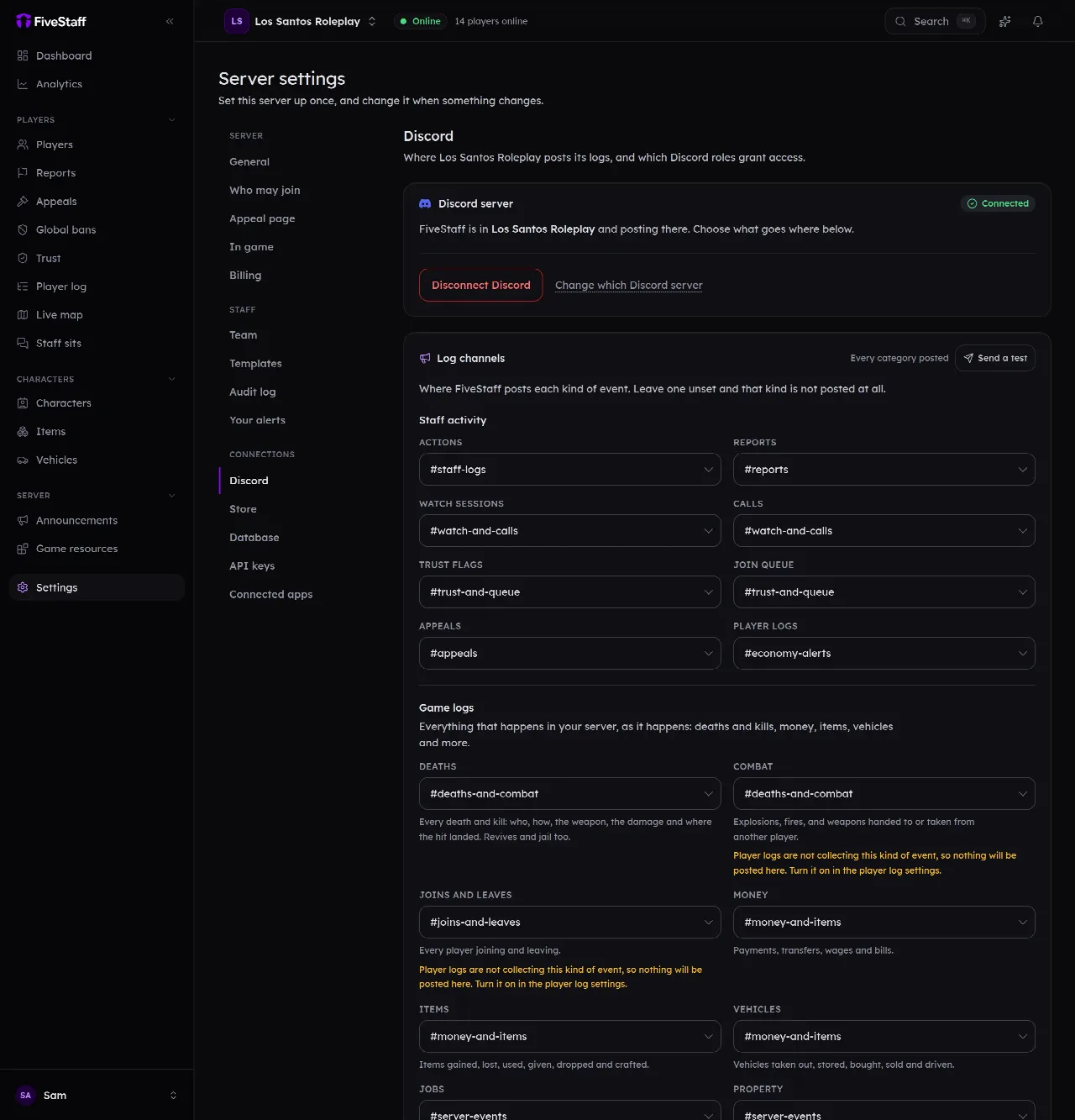
One button adds the bot. Then you pick the channels from a list instead of pasting IDs, and the things that happen on your server show up where your team already is — with the staff roles you already use deciding who can do what.
- slash commands, each behind the same permission as in the panel
- 13: slash commands, each behind the same permission as in the panel
- kinds of log, each posted to the channel you pick
- 18: kinds of log, each posted to the channel you pick
- button to add the bot. Channels and roles are picked from a list, never pasted
- 1: button to add the bot. Channels and roles are picked from a list, never pasted
Your roles are the permissions
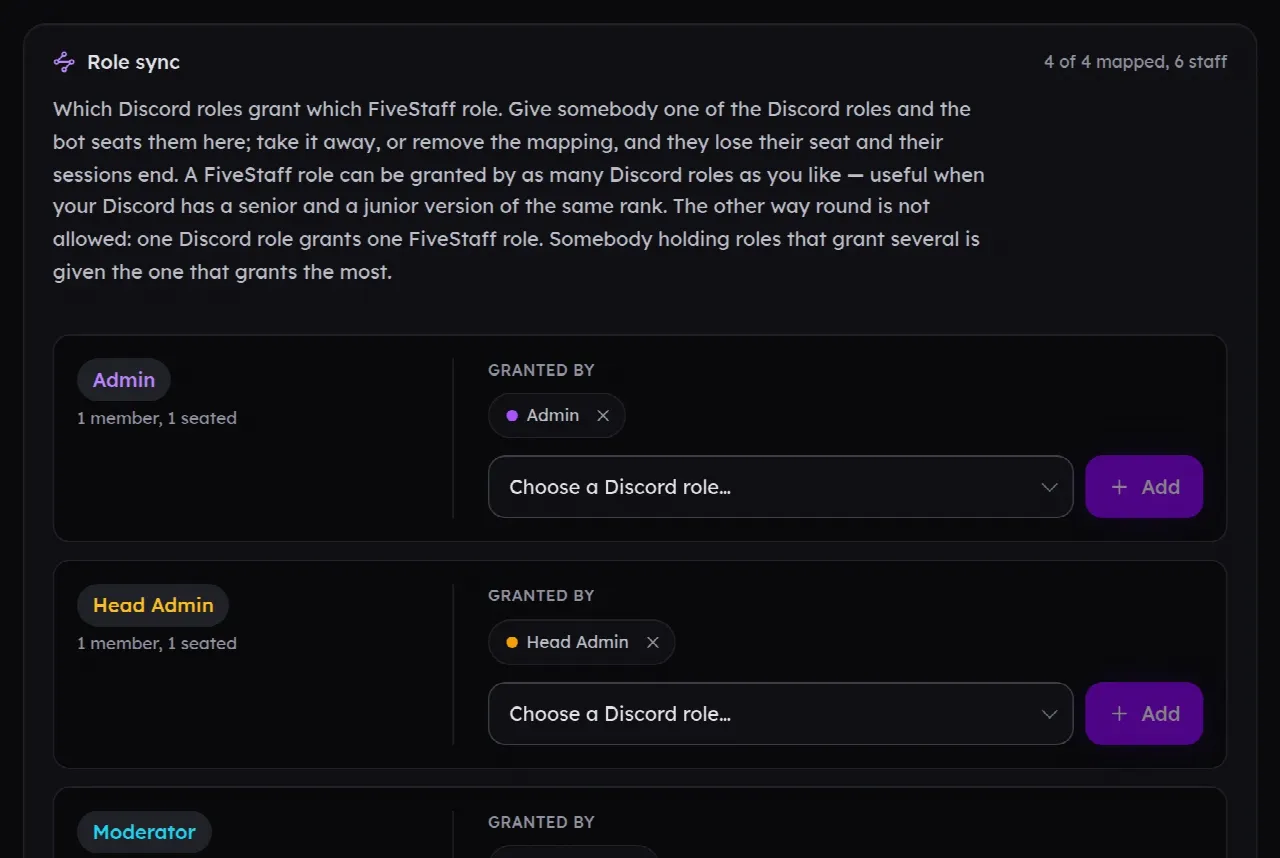
Give your Discord moderator role the powers a moderator should have, once. Somebody promoted in Discord is promoted in FiveStaff, and somebody who leaves loses it the same way.
Logs you choose, in the channels you choose
Bans in one channel, reports in another, staff actions somewhere only your admins can see. Pick what goes where from a list of your own channels.
Act on it from Discord
Look a player up, and handle a report from the post about it, without anybody opening the panel.
Alerts that mean something
Tell FiveStaff what is worth waking somebody for — a player who dies eleven times in ten minutes, a vehicle spawned nobody can account for — and it says so in the channel, on the phone, or by email.
In the panel
Set it up by picking from your own server
FiveStaff reads your Discord's channels and roles, so setting it up is choosing from lists rather than copying IDs.
Slash commands
Moderation from any channel the bot can see
Commands work only for people on your team, each needs the permission it needs in the panel, and every one is written to the audit log as done from Discord.
-
/playerLook up a player on your server -
/onlineWho is on the server right now -
/serverWhether the server is up, and how many are on -
/reports openThe reports still waiting -
/report viewOne report in full -
/logsRecent entries from the audit log -
/warnA warning they see in game -
/kickOff the server. They can rejoin -
/banFor 30m, 12h, 7d or 4w, or permanent -
/unbanLift a ban -
/noteA note on their record. They are not told -
/commendSomething good on their record -
/allowlistAdd, remove, check and list who may join
Everything that happens on your server, where your team already is
Game logs go out through a webhook the bot makes in each channel, so a busy server does not slow your commands down.
Staff logs
- Every warning, kick, ban, note and commendation
- New reports, with Claim and View buttons
- Watches and calls
- Low-trust joins and the join queue
- Appeals and their decisions
- Your alert rules firing
Game logs
- Deaths: who, how, the weapon, the damage, where it hit and from how far
- An optional picture of the moment of death
- Combat: explosions, fires and weapons handed over
- Joins and leaves, money, items and vehicles
- Jobs, property, restarts and your own scripts
Roles
- Discord roles grant FiveStaff roles
- Promotions and departures follow on their own
- Trials can hand out the Discord role on sign-off
The bot
- Added with one button
- Tells you when it cannot post to a channel
- Busy channels share their posts fairly, and say when some were left out
Questions people ask first
Why can't we freeze or teleport from Discord?
Because those need somebody watching. Discord is for decisions about a person — a warning, a ban, a note. Decisions about a scene belong in the panel or the game, where you can see it.
What does the bot need permission to do?
See and post in the channels you choose, manage roles if you use role sync, and manage webhooks for the game logs. Without that last one the game logs still post, as the bot, more slowly.
Can somebody outside our team use the commands?
No. A command only works for people on your team, and only for what their role allows.
What if our Discord goes quiet on busy nights?
Each channel takes its turn, so one busy server cannot hold the rest up. If a channel gets more than Discord allows, the least important logs are left out and the next post says how many — every one of them is still in the player log.
All of it comes with the same install
There is nothing to add on and nothing per member of staff. The free plan seats 3 and keeps 30 days of history; Pro seats everybody, keeps 12 months, and adds live view and calls.
Next
Mobile app
Coming soon — the whole panel on a phone, with push and lock screen widgets.
Try discord on your own server
Sign in with Discord, add your server, and drop one resource into it. Free to get started, and nothing to cancel if it is not for you.
No card · Free to get started · One resource