Skip to content

Free tool

Every form of a FiveM identifier, from whatever you were given

Paste a steam: hex from a ban list, a SteamID64, a Discord ID or a whole entry copied out of txAdmin. You get the Steam profile link, the other Steam formats, the day the Discord account was made, and what each identifier can and cannot tell you.

  • Nothing you type leaves your browser
  • Free, with no account

How to use it

Identifier converter in three steps

  1. 1

    Paste what you have

    One identifier, a list, or a whole ban entry with names and reasons in it. Prefixes are optional, and anything that is not an identifier is left alone.

  2. 2

    Read every form of it

    Each account gets one row: the identifier as FiveM writes it, the other ways of writing the same account, a link you can open, and for Discord, when the account was made.

  3. 3

    Copy what you need

    One value, the whole list as FiveM identifiers for a ban list or an allow list, or the table for a spreadsheet.

Reference

What each FiveM identifier is

A player connects with whichever of these their PC can provide. Which ones arrive depends on what is running when they launch FiveM, so two players on the same server rarely have the same set.

steam:110000112345678

Steam

Their Steam account, written in hexadecimal. It is the same number as the SteamID64 in a profile link, which is why it converts both ways. It is only sent when Steam is running, so a player can join without one, and a new Steam account costs nothing.

license:3f8c2a91…5d6f1b29

Rockstar licence

Tied to the Rockstar account that owns their copy of GTA V. Every player has one, and it is the hardest to replace, because a new one means another copy of the game. It is a one-way code: nothing turns it into a name or an email address.

license2:…

Second licence

A second code from Rockstar that newer FiveM builds send alongside the first. Treat it exactly as you treat the licence.

discord:412938475610293847

Discord

Their Discord user ID, sent when Discord is running on the same PC. The number carries the moment the account was made, which is the quickest check on a suspected alt: a new face with a two-day-old Discord account is worth a second look.

fivem:2841937

Cfx.re account

Their account number on the Cfx.re forum, when they are signed in to one. Plenty of players are not, so its absence means nothing.

xbl:… live:…

Xbox and Microsoft

An Xbox user ID and a Microsoft account ID, sent when Windows is signed in to them. Rarely useful on their own, but they often survive when somebody comes back with a fresh Steam and Discord account.

ip:203.0.113.42

IP address

Where they connected from. A household, a university or a mobile network puts many people behind one address, and it changes when they move or their provider rotates it. Use it to link accounts, never as the only reason for a ban.

3:9f2c…

Hardware tokens

Several codes FiveM derives from the player’s machine rather than an account. They are what catches somebody who returns on the same PC with every account replaced.

Which identifier to ban on

All of them. A ban held against one identifier is a ban held until the player makes a new account of that kind — a new Steam account is free and takes two minutes — so admin tools worth using check every identifier on every connection, and one match is enough to refuse them.

If you can only keep one, keep the licence: every player has one, and replacing it means buying the game again. Keep the IP address as a link between accounts rather than a ban in itself, because a whole student hall can share one, and add the hardware tokens wherever your tools record them.

Steam hex, SteamID64, SteamID and SteamID3

They are four ways of writing one 64-bit number. FiveM writes it in hexadecimal after steam:, Steam puts it in decimal in a profile link (the SteamID64), and older games and admin tools write the account number inside it as STEAM_0:Y:Z, where Y is the account number’s last bit and Z is the rest of it halved. SteamID3 is the account number written as [U:1:N].

The arithmetic is short: a SteamID64 is 76561197960265728 plus the account number. So steam:110000112345678 is the SteamID64 76561198265685624, account number 305419896, STEAM_0:0:152709948 and [U:1:305419896]. The converter does this with exact whole-number maths, because the usual JavaScript number rounds a SteamID64 and quietly gives you somebody else’s profile.

A custom profile address, steamcommunity.com/id/ and a name, cannot be converted without asking Steam, and this tool asks nobody. Open the profile, or ask the player for the steamcommunity.com/profiles/ link instead.

How a Discord ID tells you its age

A Discord ID is a snowflake: the top 42 bits are the number of milliseconds since the first moment of 2015, when Discord’s clock starts. Shift the ID right by 22 bits, add 1 January 2015, and you have the moment the account was made, to the millisecond.

It is the most useful thing in a ban evader’s identifiers. A player claiming to be new with a Discord account made last Tuesday, joining a week after somebody with the same habits was banned, is a conversation worth having.

Identifiers are your players’ personal data

An IP address, and anything that singles out one person, is personal data. Keep identifiers in staff-only channels rather than pasting them into a public ban log, and only look at a player’s identifiers when you have a reason to.

This converter runs entirely in your browser. Nothing you paste is sent to FiveStaff or anybody else, nothing is stored, and closing the tab is the end of it.

With FiveStaff

Or let FiveStaff keep every identifier for you

A converter is for the ban list somebody sent you. On your own server, FiveStaff records every identifier a player connects with, every time, and does the matching itself.

  • Every identifier, on every connection

    Licence, Discord, Steam, IP address and hardware tokens, kept on a profile per player whether they come back or not.

    Players and records
  • Found from whatever you were given

    Paste a whole licence, Discord ID, Steam ID or IP address into the Players search and you are on that player’s profile.

    Players and records
  • Alts linked without anybody looking

    Two players who share an identifier are linked, and if one is banned the other is marked as linked to a ban for your team to look at.

    Trust score
  • Bans checked against all of them

    Every identifier is checked on every connection, so one match keeps them out. Bring your existing bans across from txAdmin, EasyAdmin or vMenu.

    Bans and appeals
  • Addresses nobody can read

    IP addresses and hardware tokens are stored as a one-way code, so staff can see that two players share one without seeing it, and opening a player’s identifiers goes in the audit log.

    Team and permissions
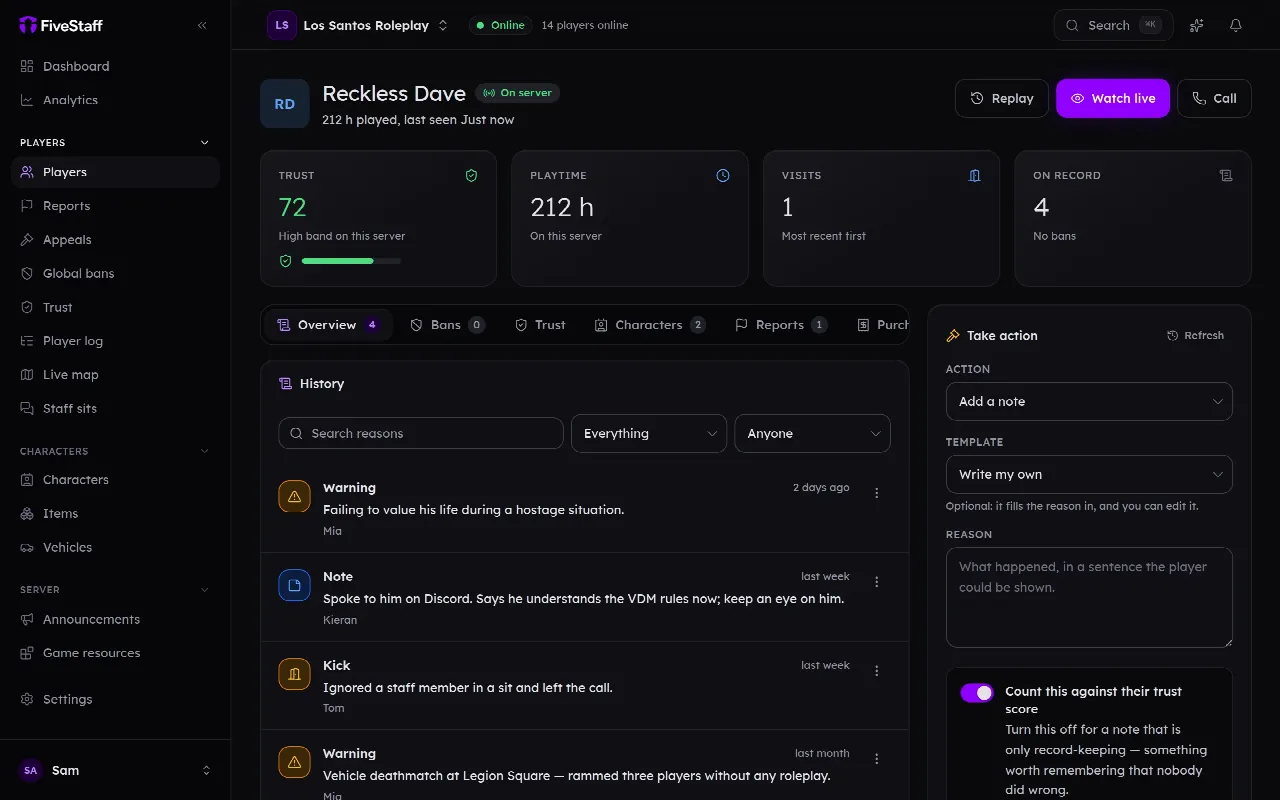
panel.fivestaff.gg
A player’s profile in the FiveStaff panel: their history, linked accounts and the actions staff can take
The real panel, from a demo server. Every name in it is invented.

Questions people ask first

Is it safe to paste my players’ identifiers here?

Yes. The converter runs in your browser: nothing you paste is sent to FiveStaff or anybody else, and nothing is saved. Close the tab and it is gone.

How do I convert a steam: hex to a SteamID64?

Paste it in. The hex after steam: is the SteamID64 written in base 16, so steam:110000112345678 is 76561198265685624, and the converter gives you the profile link to open as well.

Can it turn a licence into a player’s name?

No, and nothing else can either. A Rockstar licence is a one-way code. Search for it in your own records, or in your admin tool, to find who it belongs to.

Can it tell me the Discord username behind an ID?

Not without asking Discord, which this tool does not do. Open the profile link while signed in to Discord, or paste the mention into a Discord message and it shows the name.

STEAM_0 or STEAM_1?

The same account. The first digit is a part of the format older games printed as 0 and newer ones as 1. The converter accepts either and writes STEAM_0.

Why is a player’s steam: identifier missing?

Steam was not running when they launched FiveM. Unless your server requires Steam, that is allowed, which is why a ban should be held against every identifier rather than the Steam one.

Put your server on the record

Sign in with Discord, add your server, and drop one resource into it. Free for 3 staff, and nothing to cancel if it is not for you.